
People & access
Configure positions and permissions
Build a chain of command where responsibility and access survive annual turnover.
Guide at a glance
How to use this guide
Start with
Have the person’s exact account email, unit, role, roster link, and any held position available before changing access.
By the end
The person can reach what their duty requires, cannot reach unrelated areas, and remains individually attributable.
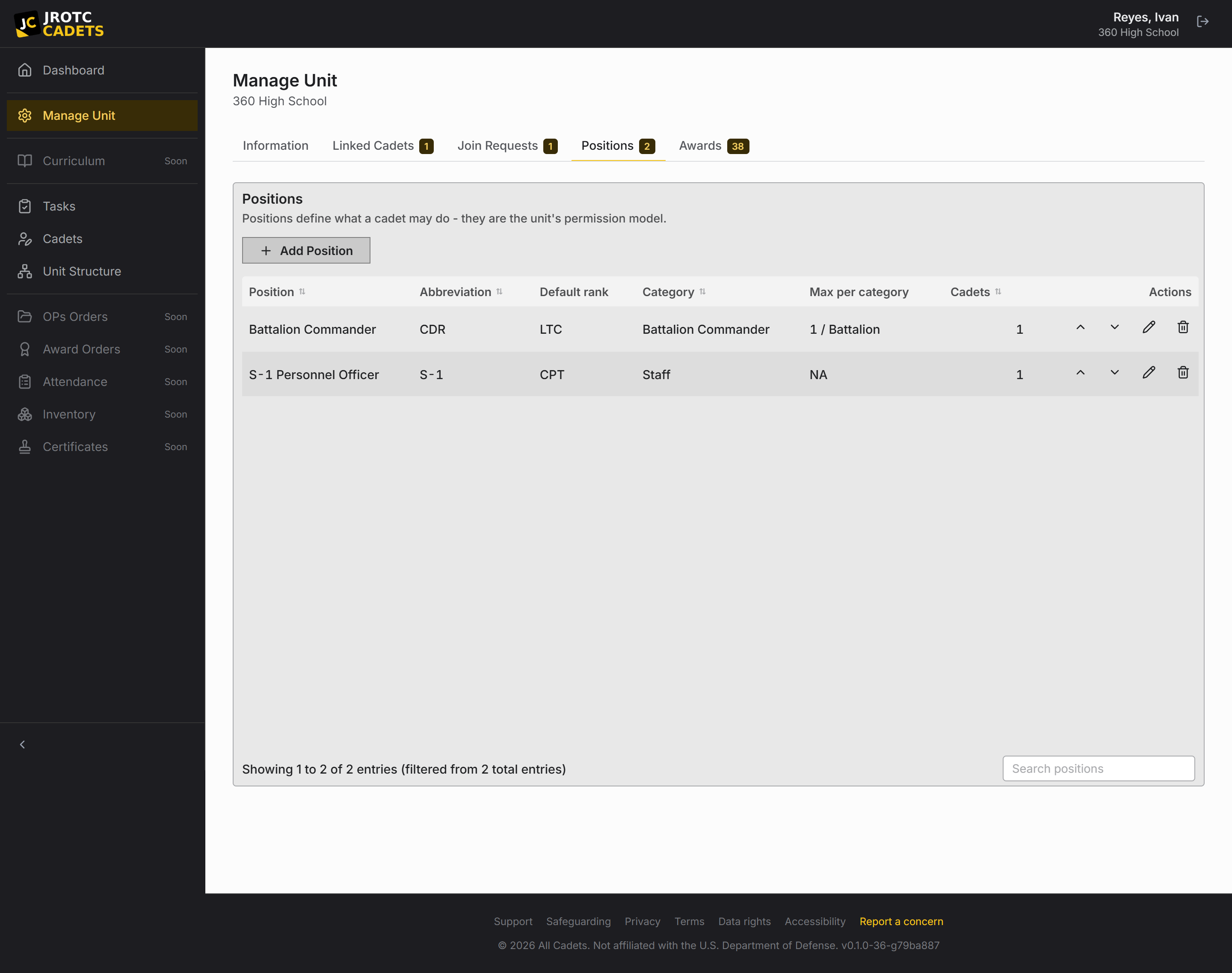
Why permissions belong to positions
A billet describes a continuing responsibility; a Cadet is its temporary holder. Attaching permissions to the billet means access follows the job and does not linger on a graduate’s account.
Vacant is a valid position state. You can define next year’s structure before assigning a holder.
Design positions around real responsibilities
- Use the names the unit already uses.
- Give each position only the actions its holder must perform.
- Keep approval bypass separate from the ability to propose a change.
- Prefer several narrow positions over one all-powerful staff role.
- Document why a position has a sensitive grant.
Assign and verify
- 1Create the position in the correct place in the unit structure.
- 2Attach the minimum grants needed for the role.
- 3Assign the Cadet who currently holds the billet.
- 4Have the Cadet sign in and test a normal task.
- 5Check the change history after their first proposed or direct action.
Handle change of command
Remove the outgoing Cadet from the position and assign the incoming holder. The permissions then move with the billet.
Reconsider direct-apply rights at every turnover. The new holder can begin with the approval queue and earn the narrower bypass later.
Practical playbook
Checks, outcomes, and troubleshooting
Use this section when you are carrying out the task now, or when the ordinary path did not produce the expected result.
Before you act
- Write down the real duty the position performs before selecting permissions.
- Separate access needed to view information from authority needed to change official records.
- Test with a representative Cadet account rather than assuming an instructor view matches theirs.
Success looks like
- The holder can complete the intended duty but cannot reach unrelated records or tools.
- Sensitive changes enter the approval queue unless direct application was deliberately granted.
- Replacing the holder transfers the duty and access without editing the outgoing Cadet account.
| What you see | Likely cause | What to do next |
|---|---|---|
| The Cadet cannot open the feature | The position lacks a parent permission or the holder assignment is inactive. | Confirm the position is held, then review the permission hierarchy from parent to child. |
| The Cadet can see too much | A broad grant was used where a narrower scoped grant was enough. | Remove the broad grant, add the minimum required scope, and test again. |
| Changes skip instructor review | The position has direct-apply authority. | Remove direct apply and verify a new change creates a request before continuing. |
When to contact support. Send support the position name, intended duty, affected screen, expected access, and actual access. Do not send student records unless asked.
Key terms in this guide
- Position
- A named unit duty that can carry permissions, scope, an assigned Cadet, and continuing work.
- Direct apply
- Authority for a position holder to make a permitted change without waiting for instructor approval.
- Change request
- A proposed official change that keeps the current and proposed values available for review.
- Change history
- The attributable sequence of previous values, new values, actors, and times behind official changes.