
Unit records
Understand the Cadet record lifecycle
Create, maintain, drop, reinstate, and safely troubleshoot the unit’s official Cadet records.
Guide at a glance
How to use this guide
Start with
Begin with the existing record and its history. Search before creating, and distinguish correction, status change, and deletion.
By the end
The authoritative record is accurate, linked, placed correctly, and still explains how it reached its current state.
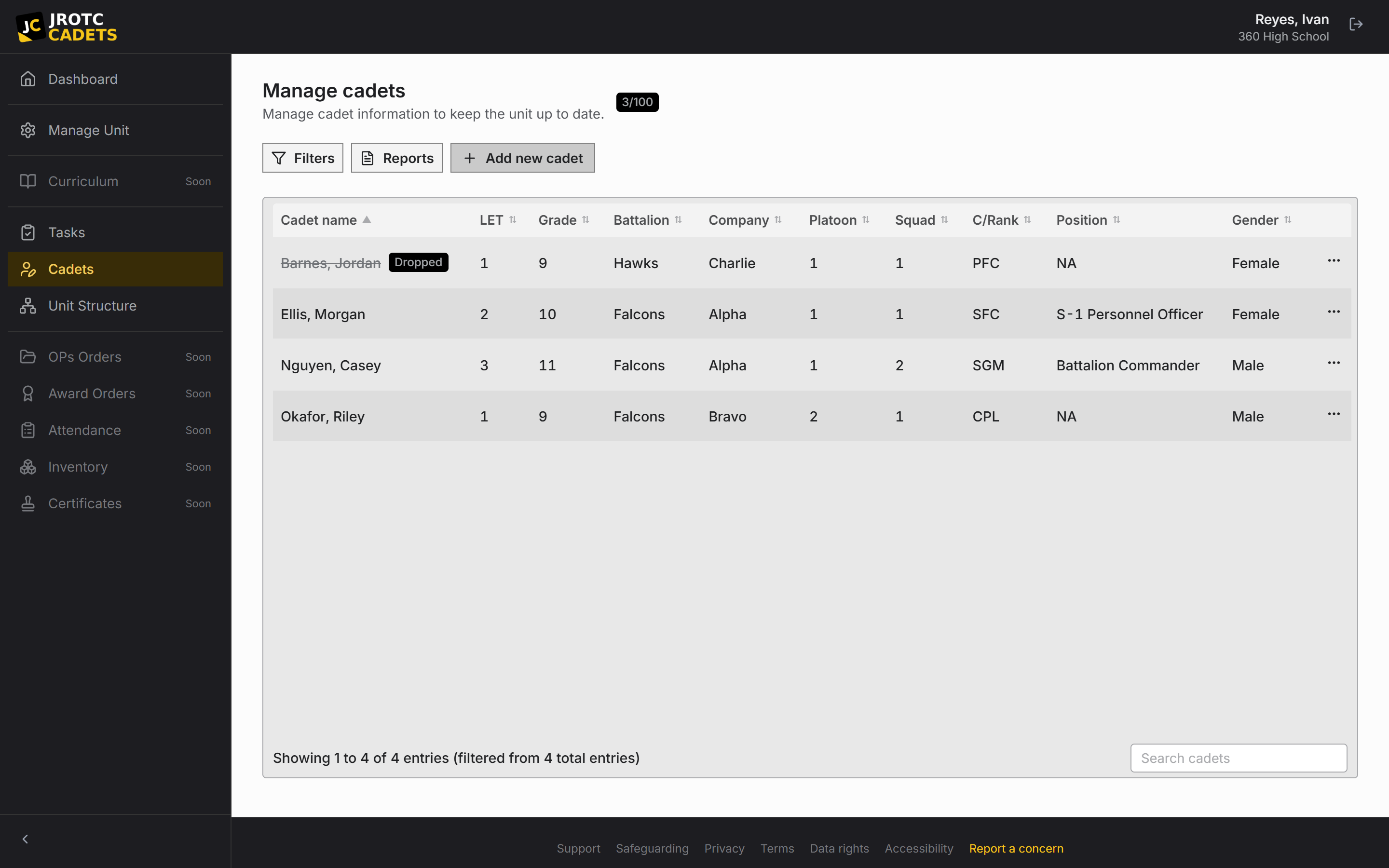
What a Cadet record contains
The core record includes course level, grade, rank, contact details, and placement. Positions, taskings, completion state, payment status, awards, and history connect to it.
Treat the roster as the official operational record, not as a copy of a spreadsheet. Make changes in the platform so they remain attributable.
Maintain one record per Cadet
Search before creating. A different email address does not mean a different person, and registration may be waiting for a link to a record that already exists.
If duplicates appear, pause and ask support which record holds the linked account and useful history.
When a Cadet leaves
- 1Drop the Cadet from the active roster.
- 2Remove them from any held position so access no longer flows through the billet.
- 3Deactivate the Cadet account.
- 4Leave the record and history intact for later review or reinstatement.
Reinstatement
Dropping is not deletion. A returning Cadet can be reinstated without recreating their history.
Before restoring access, confirm the email address is still controlled by the returning Cadet and review any position assignment that should not resume automatically.
Roster quality checks
- No duplicate active records.
- Every active account is linked to the intended record.
- Every active Cadet has a valid placement.
- Departed Cadets are dropped and deactivated.
- Positions are held only by current Cadets.
Practical playbook
Checks, outcomes, and troubleshooting
Use this section when you are carrying out the task now, or when the ordinary path did not produce the expected result.
Before you act
- Search by name, email, and current placement before creating a record.
- Decide whether the action is a correction, a normal update, a drop, a reinstatement, or a deletion request.
- Check whether the record owns positions, open taskings, or a linked sign-in account.
Success looks like
- Each person has one authoritative roster record with current placement and account linkage.
- Departed Cadets are removed from active work and access without destroying needed history.
- Corrections remain visible in change history and can be explained later.
| What you see | Likely cause | What to do next |
|---|---|---|
| A Cadet disappeared from the active roster | The record may have been dropped or filtered out. | Clear roster filters, check inactive or dropped records, and inspect history before recreating it. |
| A returning Cadet has no prior history | A new record was created instead of reinstating the old one. | Pause changes and locate the dropped record before linking the returning account. |
| Placement will not match the chart | The target formation is missing or nested under the wrong parent. | Correct and verify the unit structure first, then update the Cadet placement. |
When to contact support. Identify the record, approximate time of the unexpected change, current status, and expected status. Support may ask for the relevant history entry.
Key terms in this guide
- Cadet record
- The unit’s authoritative operational record for one Cadet; it is separate from the account used to sign in.
- Registration
- The request to create or connect a sign-in identity. It is not itself an active roster record.
- Position
- A named unit duty that can carry permissions, scope, an assigned Cadet, and continuing work.
- Dropped record
- A record removed from the active roster without erasing its history or preventing later reinstatement.
Continue reading
Register, approve, and link a Cadet account
Why sign-in and roster records are separate, and how to connect them without creating duplicates.
Read nextExport and print the roster
Prepare a clean roster for an inspection or spreadsheet workflow without changing the source record.
Read nextRead the change history
Trace what changed, who acted, and what the record contained before the change.
Read next